

Modern voice-AI systems handle multiple calls simultaneously by creating an isolated session for each inbound call on cloud-scale infrastructure, so no caller ever hears a busy signal or waits in a queue. Each session runs independently inside its own containerised or serverless runtime, with its own speech recognition stream, dialogue state, and text-to-speech output. The result is true concurrent call handling rather than sequential queuing.
Three system elements make this possible:
- Telephony ingress (SIP/CPaaS/WebRTC): routes each inbound call to a fresh AI session the moment it connects.
- Streaming ASR + NLU pipeline: processes audio in real time, stateless and independently per session, so one caller's complex query cannot slow another's.
- Session store and handoff layer: persists each conversation's context and routes to a human agent when needed, without disturbing other active sessions.
For UK businesses evaluating this technology, the most practical next step is a focused pilot: pick one high-volume, repeatable call type, instrument it for latency and escalation rate, and size capacity before expanding to peak hours.
Pro Tip: Before any pilot, ask your prospective provider how many concurrent sessions their platform has run in production and what their auto-scale trigger metric is. Vague answers here are a red flag.
Table of Contents
- What happens from the moment a call arrives to resolution
- Concurrency versus parallelism: what the difference means for your call system
- How to scale voice-AI infrastructure for high call volumes
- Why real-time audio quality determines whether callers trust your AI
- Routing, fallbacks, monitoring and SLAs: the operational layer
- UK GDPR and data protection: a practical compliance checklist for voice AI
- Limitations, failure modes and when to route to a human agent
- How to evaluate and implement multi-call voice AI for your UK business
- How Captasolutions handles concurrent calls for UK businesses
- Key takeaways
- When is the right moment to pilot voice AI in your organisation?
- Captasolutions: try a UK-ready, GDPR-aware voice-AI pilot
What happens from the moment a call arrives to resolution
Understanding the full pipeline is the foundation for every capacity, cost, and compliance decision you will make.
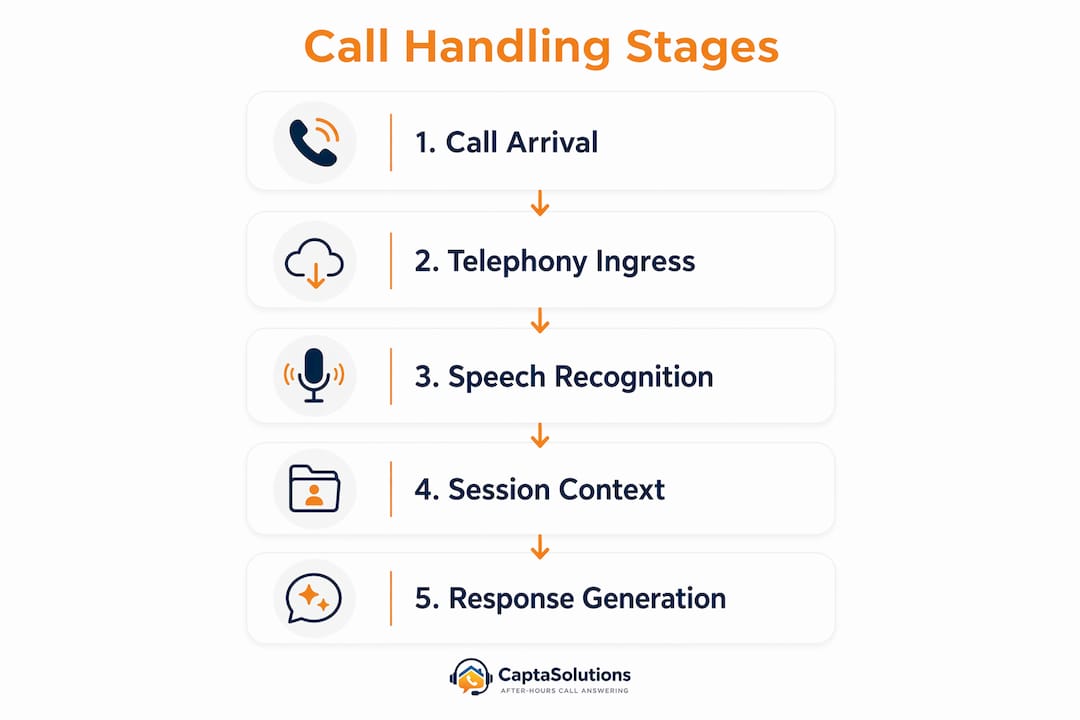
Telephony ingress
Every inbound call enters via a SIP trunk, a CPaaS platform (such as Twilio or Vonage), or a WebRTC gateway. The telephony layer assigns the call a unique session identifier and forwards the real-time audio stream to a media broker. Cloud telephony platforms distribute these streams across virtual agent instances, replacing traditional IVR menus with conversational AI that answers calls without hold times.
Media ingest, ASR, NLU and TTS
The media broker feeds raw audio into a streaming automatic speech recognition (ASR) engine. ASR transcribes speech incrementally, word by word, rather than waiting for the caller to finish a sentence. The transcript passes to a natural language understanding (NLU) model, which extracts intent and entities. A dialogue manager selects the next action, calls any required integration (CRM lookup, booking system, calendar), and passes a response to a text-to-speech (TTS) engine. Audio is synthesised and streamed back to the caller within milliseconds.

Session state and context isolation
Each session maintains its own context store: caller history, conversation turn, collected data fields, and integration results. Session isolation means one caller's complex task cannot interfere with another's. When a call ends or escalates, the session store writes a summary to the CRM and closes the runtime instance.
Architecture flow (simplified):
Telephony → Media Broker → Streaming ASR → NLU/Dialogue Manager
         → Integrations (CRM, Calendar) → TTS → Session Store → Escalation
| Pipeline stage | Primary function | Key latency driver |
|---|---|---|
| Telephony ingress | Route call, assign session ID | Network round-trip to CPaaS |
| Streaming ASR | Real-time transcription | Model inference + audio buffer |
| NLU / dialogue manager | Intent extraction, action selection | Model size, context window |
| Integration calls | CRM lookup, booking confirmation | External API response time |
| TTS synthesis | Generate spoken response | Model inference + audio encoding |
| Session store | Persist context, write CRM summary | Database write latency |
A single inbound call typically completes the ASR-to-TTS loop in under 500 milliseconds on well-provisioned infrastructure, though integration calls to slow CRM endpoints can push that figure higher.
Concurrency versus parallelism: what the difference means for your call system
These two terms are often used interchangeably, but they describe distinct engineering approaches with real cost and performance implications.
Concurrency means the system interleaves many tasks by switching between them rapidly, using asynchronous I/O so that waiting for a network response (an ASR result, a CRM reply) does not block other work. A single-threaded async event loop can manage hundreds of concurrent I/O-bound tasks this way. Think of it as one skilled coordinator juggling many conversations by pausing one while waiting for a reply and picking up another.
Parallelism means multiple tasks run at exactly the same time on separate CPU cores, threads, or containers. ML inference at high throughput, media encoding, and ASR model execution genuinely benefit from parallelism because they are compute-bound, not I/O-bound.
In practice, a production voice-AI system uses both:
- Concurrency (async I/O): handles the network-heavy parts of the pipeline: streaming audio ingestion, webhook calls, CRM lookups, and session state reads/writes.
- Parallelism (multi-container / multi-GPU): handles compute-heavy parts: ASR model inference, NLU scoring, and TTS synthesis at scale.
The practical implications differ by deployment size:
- A small business handling 10–30 simultaneous calls can often run efficiently on a modest cluster using async concurrency, with a small pool of shared ASR workers.
- A large contact centre handling hundreds or thousands of concurrent calls requires horizontal parallelism: dedicated containerised instances per session or per worker pool, distributed across multiple cloud regions.
Capacity is governed by three constraints working together: provisioned compute, available telephony bandwidth, and cumulative external API latency. An imbalance in any one of them creates a bottleneck rather than true parallelism.
How to scale voice-AI infrastructure for high call volumes
Scaling is not simply adding more servers. It requires deliberate architecture choices at each layer of the pipeline.
Horizontal scaling and containerisation
The most reliable pattern is to containerise each session or worker independently and deploy on a cloud platform that supports auto-scaling. Engineering teams building for hundreds or thousands of concurrent calls use per-call containerised runtimes on edge infrastructure, so the system can spin up new instances in seconds as call volume rises. Avoid a single central server: it becomes a single point of failure and a throughput ceiling.
Auto-scale triggers and thresholds
Auto-scaling should respond to telephony-specific metrics, not generic CPU load:
- Calls per second (CPS): the primary trigger; set a threshold at roughly 70–80% of tested peak capacity.
- Average call duration: longer calls consume more persistent compute; factor this into instance sizing.
- ASR latency: if streaming ASR turnaround exceeds your SLA threshold (commonly 300–400 ms), scale ASR worker pools before the queue backs up.
- Session queue depth: any non-zero queue means callers are waiting; trigger scale-out immediately.
Edge and regional distribution
For UK deployments, routing media streams to the nearest edge node reduces round-trip latency. Use geo-routing at the telephony layer to direct calls to the closest regional cluster. This matters most for real-time audio: even 50 ms of additional network latency is perceptible in conversation.

| Capacity driver | Bottleneck symptom | Mitigation |
|---|---|---|
| Per-session compute | High CPU, slow TTS | Add container replicas, right-size instance type |
| Telephony bandwidth | Dropped media streams | Increase SIP trunk capacity, add concurrent stream licences |
| ASR/NLU latency | Long response pauses | Scale ASR worker pool, cache frequent NLU results |
| External API (CRM) | Slow integrations, timeouts | Async calls with circuit breakers, local caching |
| Session store writes | Context loss on failover | Replicated database, write-ahead logging |
Key scaling practices:
- Use stateless session handlers so any container can serve any call; session state lives in a shared store, not in the container.
- Apply rate limiting at the telephony ingress to prevent call storms from overwhelming downstream services.
- Distribute inbound calls across containerised instances on cloud-based edge infrastructure and auto-scale horizontally to avoid performance degradation.
- Run staged load tests at 50%, 75%, and 100% of projected peak before going live.
Why real-time audio quality determines whether callers trust your AI
The technical pipeline can be architecturally sound and still feel broken to a caller if audio quality is poor or the AI's timing is off.
Full-duplex audio and interruption handling
Traditional half-duplex systems stop listening when they speak, forcing callers to wait for the AI to finish before they can respond. Full-duplex architectures let the system listen while it speaks, enabling natural interruptions and far more human-like conversation. When a caller says "actually, wait" mid-sentence, a full-duplex system detects the interruption, stops speaking, and processes the new input immediately. Industry specialists report that this shift has moved caller perception away from "robotic" toward genuinely natural interaction.
Streaming ASR and low-latency TTS
Streaming ASR sends partial transcripts to the NLU model before the caller has finished speaking, so the dialogue manager can begin preparing a response earlier. Combined with a low-latency TTS engine that streams audio output rather than rendering the full response before playback, this keeps the end-to-end voice round-trip well within acceptable UX thresholds.
Audio quality checklist:
- Select a codec appropriate for your telephony path (G.711 for PSTN, Opus for WebRTC) to balance quality and bandwidth.
- Configure jitter buffers at the media broker to smooth packet arrival variation without adding perceptible delay.
- Apply echo cancellation at the media layer, not in post-processing, to prevent feedback loops on speakerphone calls.
- Implement packet loss concealment so brief network drops do not produce audible glitches.
- Tune dialogue manager pause thresholds to match natural British English speech rhythm: callers pause mid-sentence more than many default models expect.
Pro Tip: Test your AI's interruption handling with real staff before going live. Ask them to interrupt mid-sentence, speak over the AI, and use filler words like "um" and "actually." If the system handles these gracefully, callers will too.
Routing, fallbacks, monitoring and SLAs: the operational layer
A well-architected system still needs operational controls to stay reliable under real-world conditions.
Monitoring metrics
| Metric | What it signals | Alert threshold (example) |
|---|---|---|
| Calls per second (CPS) | Overall load | >80% of tested peak |
| Mean ASR latency | Pipeline health | >400 ms |
| NLU confidence score | Dialogue quality | <0.70 triggers escalation |
| Escalation rate | AI resolution quality | a high rate warrants dialogue review |
| Error rate (session failures) | Infrastructure health | >1% triggers incident |
| Media stream health | Audio quality | Packet loss >2% |
Fallback flows and retry logic
Every production deployment needs defined fallback paths. When the AI cannot resolve a query, the system should:
- Offer a scheduled callback rather than leaving the caller on hold.
- Route to voicemail with a clear, branded message if no human agent is available.
- Apply exponential back-off on outbound retry attempts to prevent call storms.
- Never attempt unlimited retries; set a hard cap and log each attempt for audit.
Session isolation and retry rules together prevent one problematic call from consuming disproportionate resources or triggering runaway retry loops.
Load balancing for telephony AI
Telephony load balancing differs from standard HTTP load balancing because media streams are stateful for the duration of a call. Use sticky sessions at the media layer so a call's audio stream stays anchored to the same media server throughout. Apply geo-routing at the SIP layer to direct calls to the nearest regional cluster. Reserve a proportion of capacity as headroom for unexpected spikes, particularly around marketing campaigns or seasonal peaks.
Operational controls checklist:
- Define SLA targets for ASR latency, first-response time, and escalation rate before go-live.
- Set automated alerts for each metric in the monitoring table above.
- Document escalation paths and test them monthly with simulated high-confidence-failure calls.
- Review escalation rate weekly during the first month of production; a rising rate signals a dialogue or ASR tuning problem.
UK GDPR and data protection: a practical compliance checklist for voice AI
Voice data is personal data under UK GDPR. Every business deploying AI call handling must address the following before going live.
Lawful basis and recording notices:
- Identify your lawful basis for processing voice data (legitimate interests, contract performance, or consent) and document it in your Record of Processing Activities (RoPA).
- Play a clear recording notice at the start of every call: callers must know the call may be recorded and processed by AI.
- For outbound AI calls, ensure you have a valid lawful basis before dialling; unsolicited AI calls to individuals on the Telephone Preference Service (TPS) register are prohibited.
Data minimisation and retention:
- Collect only the data fields the call purpose requires; do not record or store full audio if a transcript suffices.
- Set retention periods proportionate to the business purpose (commonly 30–90 days for call recordings) and enforce automated deletion.
- Store recordings and transcripts in UK or UK-adequate data centres; confirm your provider's data residency commitments in writing.
Security and access controls:
- Encrypt media streams in transit using SRTP; encrypt stored recordings and transcripts at rest.
- Tokenise or redact payment card data (PCI DSS scope) and NHS numbers in real time before they reach the session store.
- Restrict access to call recordings to named roles; log every access event for audit purposes.
Subject access and audit trails:
- Maintain a log of every AI decision point (intent classification, escalation trigger, data field captured) so you can respond to Subject Access Requests within the statutory 30-day window.
- Design escalation paths to preserve the full conversation context so human agents can provide continuity without asking callers to repeat themselves.
Pro Tip: If you use a managed voice-AI provider, request their Data Processing Agreement (DPA) before signing any contract. Under UK GDPR, you are the data controller; the provider is the processor. Their DPA must specify data residency, sub-processor lists, and breach notification timescales.
For professional services businesses, the compliance considerations for AI call handling extend to sector-specific regulations such as FCA rules for financial services and CQC requirements for health and social care.
Limitations, failure modes and when to route to a human agent
No voice-AI system is infallible. Understanding where it fails is as important as understanding where it excels.
Common failure modes:
- ASR mismatch: strong regional accents, background noise, or unusual vocabulary reduce transcription accuracy and cause the dialogue manager to misclassify intent.
- Low NLU confidence: ambiguous or multi-part queries produce low confidence scores; without a defined threshold and fallback, the system may give an incorrect response confidently.
- Network congestion: packet loss above 3–5% degrades audio quality to the point where ASR accuracy drops sharply.
- Third-party API timeouts: a slow CRM or booking system response blocks the dialogue manager, increasing response latency or causing session failures.
- Telephony provider limits: SIP trunks and CPaaS platforms have concurrent stream limits; exceeding them drops calls silently unless you have overflow routing configured.
Mitigation strategies:
- Set NLU confidence thresholds (for example, below 0.70) that trigger an automatic escalation rather than a guess.
- Implement circuit breakers on all external API calls; if a CRM endpoint fails three consecutive times, route to a human rather than retrying indefinitely.
- Use graceful degradation: if ASR quality drops, prompt the caller to repeat or offer a keypad fallback.
- Monitor telephony provider capacity and set alerts before you reach concurrent stream limits.
Scenarios that should always route to a human:
- Callers expressing distress, anger, or vulnerability.
- Complex negotiations, complaints, or legal matters.
- Queries involving sensitive personal data the AI is not authorised to process.
- Any situation where the caller explicitly requests a human agent.
Concurrency capacity is not infinite. Provisioned compute, telephony bandwidth, and external API latency each impose a ceiling. Plan for your realistic peak, add headroom, and design overflow routing before you need it.
For a broader view of how AI reduces pressure on staff while keeping humans in the loop for complex cases, the AI and staff overload guide covers handoff strategies in detail.
How to evaluate and implement multi-call voice AI for your UK business
A structured evaluation process prevents costly surprises after go-live.
Vendor questionnaire: questions to ask before you commit
- What is your maximum tested concurrent session count, and what infrastructure underpins it?
- Where is call data processed and stored? Is UK or UK-adequate data residency guaranteed in writing?
- What telephony trunking options do you support (SIP, CPaaS, WebRTC), and what are the concurrent stream limits per number?
- What telemetry and monitoring do you expose (ASR latency, NLU confidence, escalation rate, error rate)?
- How are human escalations handled? Does the agent receive full conversation context at handoff?
- What is your SLA for uptime and mean ASR latency, and what remedies apply if you breach it?
- Do you provide a Data Processing Agreement covering UK GDPR obligations?
Load and UX test scenarios
- Peak-minute test: simulate your highest expected calls-per-minute for a sustained 10-minute window; measure ASR latency, session failure rate, and escalation rate.
- Staggered campaign simulation: ramp call volume from 20% to 100% of peak over 30 minutes to test auto-scale responsiveness.
- Edge-case dialogues: test strong regional accents, background noise, mid-sentence interruptions, and multi-intent queries to expose ASR and NLU weaknesses.
- Integration stress test: simulate CRM latency spikes (500 ms, 1,000 ms, 2,000 ms) and verify the system degrades gracefully rather than failing silently.
Decision matrix: in-house, managed SaaS, or hybrid
| Approach | Cost | Complexity | Control | Best for |
|---|---|---|---|---|
| In-house build | High capex | High | Full | Large enterprises with dedicated ML teams |
| Managed SaaS | Predictable opex | Low | Moderate | SMEs and mid-market businesses |
| Hybrid | Medium | Medium | High | Businesses with existing telephony needing AI overlay |
Pilot acceptance criteria
- Mean ASR latency below commonly recommended thresholds at peak load.
- High NLU accuracy on your specific call types (measure against a labelled test set).
- Escalation rate low enough for the targeted call workflow.
- Zero data residency breaches confirmed by provider audit log.
For businesses new to AI call answering, the practical UK switching guide covers migration steps and change management in detail.
How Captasolutions handles concurrent calls for UK businesses
Captasolutions is built on the architecture principles described throughout this article: session isolation per inbound call, cloud-scale infrastructure, and a managed pipeline that covers telephony ingress through to human handoff.
Typical configuration for a UK business:
- Phone number routing: forward your existing UK number to Captasolutions, or provision a new number; calls reach the AI within seconds.
- Script and persona configuration: define how the AI introduces itself, what questions it asks, and which call types it escalates immediately.
- CRM and portal integration: captured caller details and qualified leads appear in your Captasolutions client portal in real time; export to your existing CRM via webhook.
- GDPR settings: recording notices, data retention periods, and data residency are configured at onboarding; a Data Processing Agreement is provided as standard.
- Human handoff: calls meeting your escalation criteria transfer to a named team member or overflow number with full context passed in real time.
Captasolutions answers every call in your business name, 24 hours a day, seven days a week, with no busy signals and no queuing. For UK tradespeople and service businesses, this means every inbound lead is captured even when you are on a job, in a meeting, or after hours.
Pro Tip: Start your Captasolutions pilot on after-hours calls first. Call volume is lower, the risk of a missed escalation is reduced, and you will gather real performance data before expanding to peak hours. The after-hours AI call guide explains how to configure this effectively.
Performance characteristics are available directly from Captasolutions on request; the team can provide throughput ranges and latency benchmarks relevant to your call volume and sector.
Key takeaways
AI handles multiple calls simultaneously through session isolation on cloud-scale infrastructure, and the reliability of that approach depends on provisioned compute, telephony bandwidth, and integration latency working in balance.
| Point | Details |
|---|---|
| Session isolation is the core mechanism | Each call runs in its own containerised session; no caller's query can slow or interfere with another's. |
| Three constraints cap concurrency | Compute, telephony bandwidth, and external API latency each impose a ceiling; plan for all three before sizing your pilot. |
| Full-duplex audio drives caller trust | Systems that listen while speaking handle interruptions naturally and shift caller perception from robotic to human. |
| Instrument before you scale | Set ASR latency, NLU confidence, and escalation rate targets before go-live; rising escalation rate is the earliest warning of a tuning problem. |
| Captasolutions for UK businesses | Captasolutions provides a managed, GDPR-aware concurrent call handling service with a free 30-day trial and no contract required. |
When is the right moment to pilot voice AI in your organisation?
The most common mistake businesses make is waiting until they have a "call crisis" before piloting voice AI. By that point, the pressure to deploy quickly overrides the careful instrumentation that makes a pilot genuinely useful. The better approach is to pilot during a period of moderate, predictable call volume, so you can measure accurately and iterate without operational pressure.
Scope the pilot tightly. Pick one call type that is high-volume, low-complexity, and well-defined: appointment booking, opening hours enquiries, or initial lead qualification. These workflows have clear success criteria and produce clean data. Avoid starting with complaint handling or anything requiring nuanced judgement; those cases will expose the AI's limitations before you have tuned its strengths.
Instrument from day one. The metrics that matter most in a pilot are first-contact resolution rate, escalation rate, average handle time, and caller satisfaction (measured via post-call SMS or IVR). If your escalation rate is above 25% in week one, that is not a failure; it is data telling you which dialogue paths need refinement.
On staffing: human agents do not disappear in a voice-AI deployment. They shift to handling escalations and complex cases, which are higher-value interactions. Brief your team on what the AI will handle, what it will pass to them, and what context they will receive at handoff. Resistance usually comes from uncertainty, not from the technology itself.
The progressive roll-out model works well for most UK businesses: start with off-peak hours (evenings, weekends), validate performance, then expand to peak periods once you have confidence in the system's accuracy and your escalation paths. This approach limits risk and builds internal trust in the technology before it handles your highest-value calls.
Captasolutions: try a UK-ready, GDPR-aware voice-AI pilot
Every call your business misses is a lead that moves on. Captasolutions gives UK businesses a fully managed AI call answering service that answers every inbound call in your business name, captures caller details, qualifies the enquiry, and organises everything into your client portal. No queuing, no busy signals, no missed opportunities.
The free 30-day trial requires no card and no contract, and the service is live within the hour. For businesses ready to move beyond a basic answerphone, Captasolutions provides the concurrent call handling, UK data residency, and GDPR-compliant configuration that a managed pilot demands. You stay in control: review every lead, decide what to take on, and expand the AI's scope at your own pace.
Start your free trial at captasolutions.co.uk or call 07346 811329 to speak with the team today.
Further reading and authoritative sources
- How AI voice agents handle multiple calls simultaneously — detailed engineering explanation of session isolation and concurrent call architecture.
- How we built a voice AI assistant that can handle 1,000 calls at once — a production engineering account covering containerised runtimes, edge distribution, and throughput testing.
- How many simultaneous calls can an AI voice agent manage? — practical capacity planning guidance covering compute, telephony bandwidth, and API latency constraints.
- Stanford AI Index Report — authoritative annual benchmarking of AI capability and deployment trends, useful for contextualising voice-AI maturity.
- MIT Sloan Management Review: AI — peer-reviewed analysis of AI adoption, organisational change, and ROI measurement for business leaders.
- Captasolutions — UK-ready managed AI call answering service with GDPR-compliant configuration, free 30-day trial, and no contract required.