

Out of hours enquiry management is the process of capturing, categorising, and responding to customer contacts received outside your normal business hours. For UK small businesses, this is not a nice-to-have. A customer who calls at 7pm on a Friday and hears nothing back will ring your competitor by Saturday morning. The most effective way to handle after hours inquiries combines structured triage, AI-powered call answering, and clear escalation rules that protect your staff while keeping every lead warm.
What tools do you need to manage out of hours enquiries?
The right technology stack makes the difference between a missed call and a captured lead. Three categories of tool form the foundation of any efficient after hours system: telephony, automation, and data management.
Telephony and call routing covers VoIP systems and IVR (Interactive Voice Response) menus. A VoIP platform such as RingCentral or 3CX lets you set time-based call routing rules, so calls outside business hours divert automatically to a mobile, a voicemail, or an answering service. IVR menus present callers with options ("Press 1 for emergencies, press 2 to leave a message") and route them accordingly. Regularly testing every IVR branch avoids the common pitfall of dead ends that frustrate callers and cost you the enquiry.
AI-powered voice agents and chatbots handle the bulk of non-urgent contacts without any human involvement. These tools answer in your business name, collect caller details, qualify the enquiry, and log everything to your CRM. AI after-hours systems can book appointments, send confirmations, and tag leads automatically before your team arrives in the morning. That closes the loop on enquiries that would otherwise sit unanswered until 9am.

CRM and helpdesk integration consolidates contacts from calls, web forms, and messages into one place. Tools such as HubSpot, Zoho CRM, or Freshdesk pull every after-hours contact into a single queue, so nothing slips through. Without this layer, enquiries from different channels pile up in separate inboxes and get missed.
Rotation systems distribute out of hours responsibility across your team. A shared mobile number or a call divert schedule means one person is not always on call. Rotation systems sharing after-hours duties avoid burnout and provide consistent coverage without hiring additional staff.
| Tool type | Example options | Approximate monthly cost |
|---|---|---|
| VoIP with IVR | RingCentral, 3CX | £20–£80 per user |
| AI call answering | Captasolutions | From £200 per month |
| CRM integration | HubSpot, Zoho CRM | £0–£60 per user |
| Outsourced answering | Specialist UK services | £150–£500+ per month |
Pro Tip: Set your VoIP system to play a branded out of hours message before any divert or IVR menu. Callers who hear your business name immediately feel reassured and are far less likely to hang up.
How to set up an out of hours enquiry system step by step
A working system requires more than technology. It needs a clear process that everyone in your business understands and can follow.
-
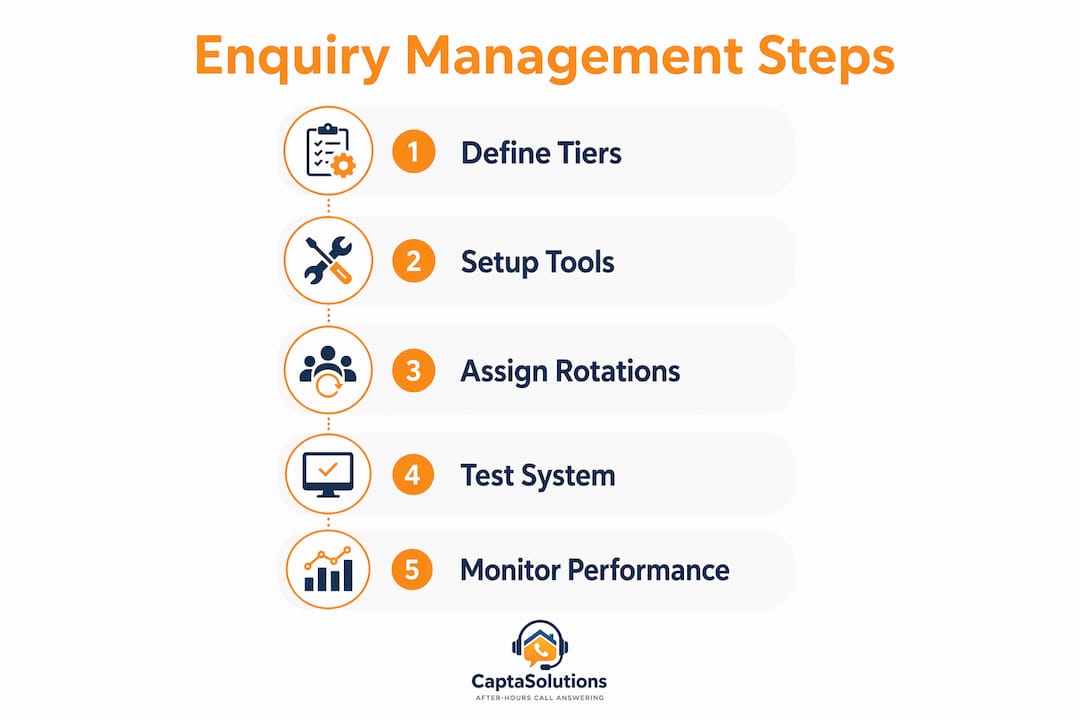
Define your urgency tiers. Categorising enquiries into tiers reduces staff overload by automating low-value tasks. Tier 1 covers FAQs and general information requests that automation handles entirely. Tier 2 covers pre-assessment enquiries where a caller needs a quote or appointment, which AI or a web form can capture and queue. Tier 3 covers genuine emergencies that require a human response within 30 minutes.
-
Write scripts and approved answers. For each Tier 1 question, write a clear, approved answer. Load these into your AI agent or IVR system. For Tier 2, create a structured data-capture script so the AI collects name, contact number, and the nature of the enquiry every time.
-
Set escalation paths and time limits. SLA-backed support targets critical incident responses within 30 minutes. Apply the same standard to your Tier 3 enquiries. Define who receives the alert, how (SMS, phone call, or app notification), and what happens if they do not respond within the time limit.
-
Test every route before going live. Call your own number outside business hours. Work through every IVR option. Trigger the emergency escalation. Check that CRM entries appear correctly. Testing takes 30 minutes and prevents weeks of missed leads.
-
Build a rotation schedule or appoint an outsourced service. If your team shares on-call duties, publish a monthly rota and make sure everyone knows the escalation script. If you use an outsourced answering service, brief them on your Tier 3 criteria and your business name.
-
Document and communicate the process internally. Write the full process in a shared document. Every team member should know what happens to a call at 10pm on a Sunday. Undocumented systems break the moment the person who built them is unavailable.
Pro Tip: Run a monthly fire drill. Have someone call your out of hours number as a test customer and time the response. If the system fails or the response takes longer than your SLA, you find out before a real customer does.
How to maintain your after-hours enquiry handling over time
Setting up a system is the start, not the finish. After-hours enquiry handling degrades without regular attention.
Track missed calls, response times, and enquiry outcomes every week. Most VoIP platforms and CRM tools produce this data automatically. A spike in missed calls usually signals a routing fault or a gap in your IVR menu. A drop in response speed often means your rotation schedule has a coverage gap.
Reviewing actual enquiry logs weekly to build approved automated answers improves response accuracy and reduces guesswork. When you see the same question appearing three times in a week, add it to your Tier 1 knowledge base. Your AI agent becomes more accurate over time only if you feed it real data.
Avoid these common mistakes that undermine after-hours systems:
- Over-complicated IVR menus. More than three options on a single menu causes callers to hang up. Keep it simple.
- No clear emergency option. Every after-hours menu needs a direct route to a human for genuine urgencies.
- Stale scripts. Prices, services, and team members change. Review all automated answers every quarter.
- Untested escalation paths. A phone number that has been changed or a team member who has left can break an entire escalation chain silently.
- No differentiation between urgent and non-urgent calls. Defining explicit boundaries for emergencies versus routine enquiries prevents unnecessary disruption to staff and protects morale.
Pro Tip: Assign one person as the system owner each quarter. Their job is to run the monthly test, review the weekly log, and update scripts. Shared ownership often means no ownership.
In-house rotation vs AI automation vs outsourced answering: which is right for you?
Most UK small businesses end up using a blend of all three approaches. Understanding the trade-offs helps you choose the right mix.
In-house rotation works well for small teams with predictable enquiry volumes. The cost is low because you use existing staff. The risk is burnout if the rota is not managed fairly, and coverage gaps when team members are ill or on leave. Rotation systems ensure fair workload and consistency without hiring extra staff, but they require discipline to maintain.
AI automation handles volume without fatigue. An AI agent answers every call at 2am with the same accuracy as at 2pm. The cost is significantly lower than hiring staff. AI-powered after-hours solutions cost between £200 and £1,500+ per month, compared to over £35,000 annually for part-time human staff. That gap is substantial for any small business watching its margins. AI works best for Tier 1 and Tier 2 enquiries. It is less suited to complex complaints or emotionally sensitive calls.
Outsourced answering services provide a human voice for callers who need reassurance. UK-based services typically offer SLA guarantees, trained agents, and call scripts tailored to your business. The cost sits between AI and in-house staff. The limitation is that agents work from a script and cannot make decisions your team would make.
| Approach | Monthly cost | Response speed | Flexibility | Best for |
|---|---|---|---|---|
| In-house rotation | Staff time only | Variable | Low | Very small teams, low volume |
| AI automation | £200–£1,500+ | Instant | High | High volume, Tier 1 and 2 |
| Outsourced service | £150–£500+ | 1–3 minutes | Medium | Businesses needing a human voice |
| Blended approach | Varies | Instant to 30 mins | High | Most UK small businesses |
The blended approach works for most businesses. AI handles the volume, a rotation covers genuine emergencies, and an outsourced service provides a human fallback for complex calls. You can read more about the role of after-hours answering for UK businesses to understand how these layers work together in practice.
Key takeaways
Effective out of hours enquiry management requires tiered triage, tested technology, and a clear escalation process that protects staff while capturing every lead.
| Point | Details |
|---|---|
| Define urgency tiers first | Categorise enquiries into Tier 1, 2, and 3 before choosing any technology. |
| AI cuts cost significantly | AI answering costs £200–£1,500 per month versus £35,000+ annually for part-time staff. |
| Test every route regularly | Run monthly checks on IVR menus, call diverts, and escalation paths to prevent dead ends. |
| Update scripts from real data | Review weekly enquiry logs and add recurring questions to your automated knowledge base. |
| Blend approaches for best results | Combine AI for volume, rotation for emergencies, and outsourced services for human backup. |
Why I think most small businesses get this wrong from the start
The most common mistake I see is businesses buying a tool before defining a process. A VoIP system or an AI agent is only as good as the triage logic behind it. Without clear urgency definitions, everything feels urgent, staff get called at midnight about a routine quote request, and the system gets switched off within a month.
The second mistake is treating after-hours handling as a one-time setup. The businesses that get real value from their systems are the ones that review their enquiry logs every week and update their scripts accordingly. A knowledge base built from real customer questions is far more accurate than one built from assumptions.
Rotation systems also get underestimated. A fair, published rota with clear escalation rules does more for team morale than any technology. Staff who know exactly when they are on call and what counts as a genuine emergency are far more willing to pick up the phone. The AI cost advantage is real, but it works best when the human layer behind it is well-organised.
My honest advice: start with a piece of paper. Write down what a Tier 3 emergency looks like for your business. Then build everything else around that definition.
— Daniel
How Captasolutions helps UK businesses handle after-hours calls
Captasolutions is an AI-powered call answering service built specifically for UK small businesses that cannot afford to miss a call. Whether you run a trades business, a salon, a clinic, or a hospitality venue, Captasolutions answers every call in your business name, 24 hours a day, 7 days a week. It captures caller details, qualifies the enquiry, and organises everything into your client portal so you review every lead on your terms. There is no contract, no card required, and the service goes live within the hour. Start your free 30-day trial at captasolutions.co.uk or call 07346 811329 today.
FAQ
What counts as an out of hours enquiry?
An out of hours enquiry is any customer contact received outside your defined business hours, including evenings, weekends, and bank holidays. The exact window depends on your business, but any contact you cannot respond to in real time qualifies.
How quickly should I respond to after-hours enquiries?
For urgent or emergency contacts, a 30-minute response target is the standard used by SLA-backed support services. Non-urgent enquiries should receive a response by the start of the next business day at the latest.
Can AI handle all out of hours calls on its own?
AI handles Tier 1 and Tier 2 enquiries well, including FAQs, appointment booking, and lead capture. Tier 3 emergencies and complex complaints still benefit from a human escalation path alongside the AI system.
How much does an out of hours answering system cost?
AI-powered solutions cost between £200 and £1,500+ per month, depending on call volume and features. This compares favourably to the £35,000+ annual cost of part-time human staff covering the same hours.
How do I stop my team burning out from out of hours calls?
Define clear urgency tiers so only genuine emergencies reach staff. Publish a fair rotation schedule, test your escalation paths monthly, and use AI or an outsourced service to absorb routine enquiries before they reach your team.